Oversight
See what your agent can and can't see. Diagnoses silent failures in your Storybook MCP manifest.
Your coding agent reads your components from the manifest Storybook's MCP server generates. When a description never reaches that manifest (extraction failed, the wrong docgen extractor ran, or the JSDoc is missing), the agent sees a component with no docs, and nothing tells you. Oversight lints the manifest per component while you work, so the gap surfaces on the component in front of you.
Requirements
- Storybook ^10.3 (React projects), and exactly one resolved copy of
@storybook/addon-docswithin that range. Two copies carry two theme contexts, so the Docs page renders blank with errors that name neither this addon nor the duplicate (#93). Mixing versions across the Storybook packages is the usual way to end up with two; from0.6.1the addon warns at startup when it detects it. - React 18 or 19 in the consumer project. The addon's manager UI renders through Storybook's own React, so your app's React version is independent (needs
0.1.1+; earlier versions crash the manager on React 19 projects). - The components-manifest feature enabled and served in dev.
@storybook/addon-mcpturns it on and serves/manifests/components.json, the manifest Oversight lints. Without it, the panel degrades to an "unavailable" state. - Storybook's experimental
experimentalDocgenServerflag disables the dev manifest by design. From0.5.0the panel and the Docs block read Storybook's in-runtime service API in dev under that flag (needs Storybook10.5+), and resolve the ref-based (v: 1) manifest a build writes; earlier addon versions report the dev manifest unavailable and the built one unparseable.oversight-lintreads the built form as well.
Install
npm install --save-dev storybook-addon-oversight
# or: pnpm add -D storybook-addon-oversight
Register it in .storybook/main.ts (alongside @storybook/addon-mcp):
const config = {
  addons: ['@storybook/addon-mcp', 'storybook-addon-oversight'],
};
export default config;
Set the extractor so JSDoc on components and props is actually extracted:
// .storybook/main.ts
const config = {
  typescript: { reactDocgen: 'react-docgen-typescript' },
};
Set the same value as expectedExtractor (see Configuration) so extractor-drift can flag a manifest built with a different extractor. The rule runs only when an expectation is configured.
If you enable features.experimentalReactComponentMeta, set expectedExtractor to react-component-meta instead. That flag chooses the extractor itself, so the manifest records react-component-meta and typescript.reactDocgen above is never read.
features.experimentalDocgenServer records the same extractor, so react-component-meta is also the value to state under that flag: expectedExtractor for the panel and the Docs block, --expected-extractor on oversight-lint for the built manifest.
Optional: enable the Docs block
Register the global container in .storybook/preview.ts to render Oversight at the bottom of every component Docs page:
import { OversightDocsContainer } from 'storybook-addon-oversight/blocks';

const preview = {
  parameters: { docs: { container: OversightDocsContainer } },
};
export default preview;
Unattached MDX pages, such as an overview with no of, keep the plain Docs container without an Oversight block. Remove the container from preview.ts to disable the block globally.
To enable it on individual component MDX pages instead, place the block on each page:
import { Oversight } from 'storybook-addon-oversight/blocks';

<Oversight />
What Oversight checks
The manifest Oversight lints is the upstream artifact: Storybook's MCP get-documentation reads from it, reformats it, and drops what it won't serve (component-level JSDoc tags among them). Which field survives that step, and in what form, is recorded field by field in What the agent actually receives. So Oversight checks two things: that the doc content the MCP will serve is present and good (component/prop descriptions), and that the pipeline building the manifest is healthy enough to deliver it (extraction succeeded and, when you configure expectedExtractor, the expected docgen extractor ran). It adds no documentation vocabulary of its own: selection guidance ("use X instead") lives as a plain redirect sentence in the component description, typical Storybook practice and passed through verbatim by get-documentation. Its one tag, @oversightIgnore, is a lint-suppression directive.
Surfaces
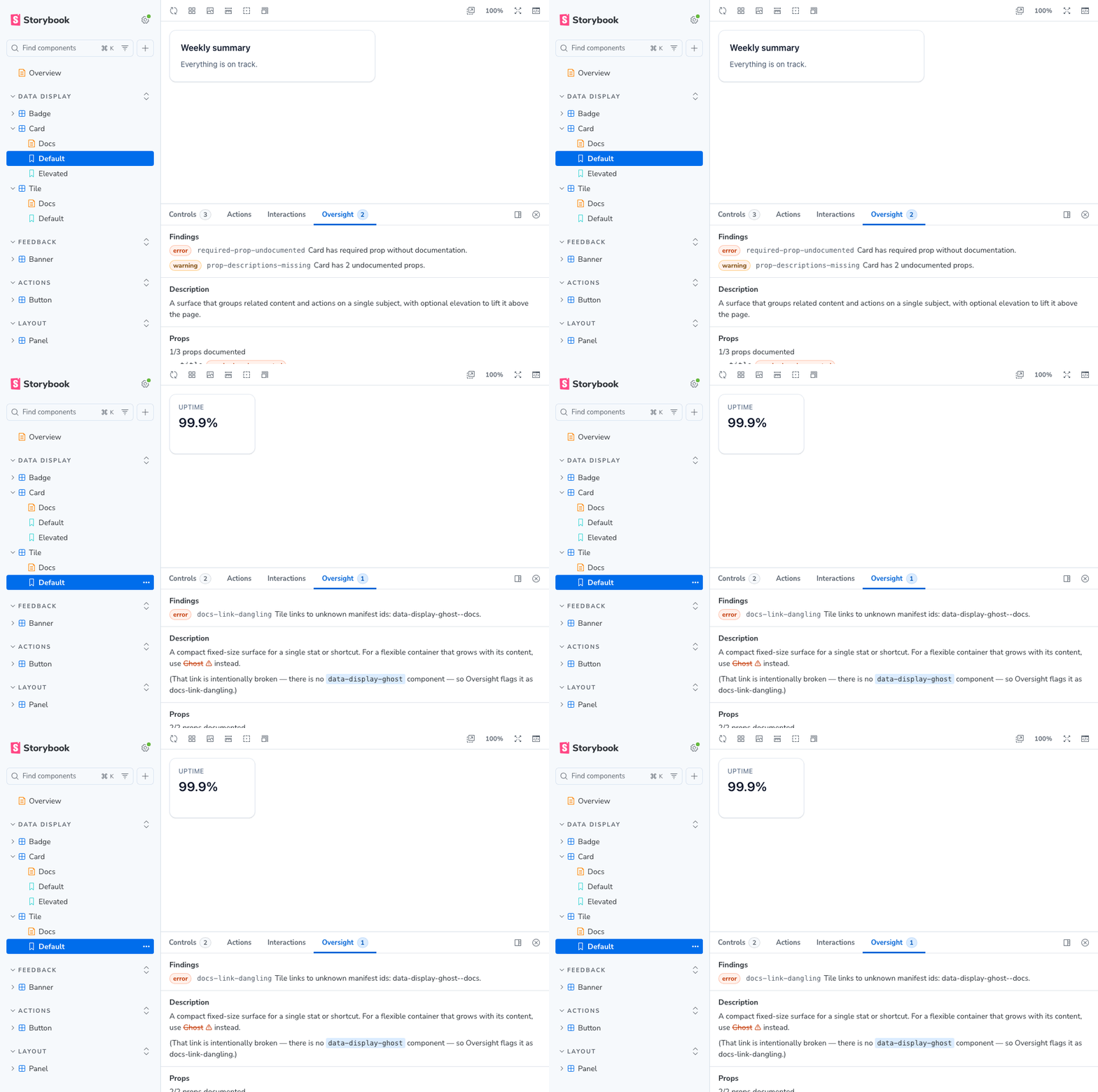
The same findings appear in two places, independently:
- Addons panel: an "Oversight" tab on every component's story view (Storybook hides addon panels on Docs pages). Registering the addon in
.storybook/main.tsenables it. - Docs block: the same coverage rendered inline on Docs pages. It is an optional step in the installation.
In CI
The same rules run headlessly over a built manifest with oversight-lint, so a change that drops a component's docs fails the build instead of surfacing only in the panel. After storybook build, point it at the emitted manifest:
npx oversight storybook-static/manifests/components.json
See oversight-lint for options, config, and exit codes.
Findings
The panel and the CLI run the same rules from oversight-core, so they are documented outside both packages:
- Rules, what each one fires on and its default severity
- Troubleshooting, a fix for every finding
- Authoring MCP-legible docs, how to write the docs that keep most of them from firing, and exempting a component with
@oversightIgnore - Why these are lint rules, the four that need judgment a raw view can't give you
In the panel, extractor-drift shows in its own Manifest section, since it's a property of the whole manifest rather than any one component.
Configuration
Addon options don't reach the manager bundle, so configuration goes through .storybook/manager.ts:
import { addons } from 'storybook/manager-api';

addons.setConfig({
  'storybook-addon-oversight': {
    expectedExtractor: 'react-docgen-typescript',
    debuggerLink: false, // hide the manifest-debugger link
    rules: {
      'deprecated-tag': 'off', // disable a rule
      'prop-descriptions-missing': 'error', // or remap its severity
    },
  },
});
Valid rules values are "off", "error", "warning", "info"; anything else is ignored and the rule keeps its default severity.
debuggerLink toggles the "manifest debugger" footer link (defaults to true): a deep link to Storybook's own components.html, which renders the raw manifest for inspection. Oversight doesn't replace that page; it lints what the page only displays, and links out to it for the raw view. The rules, expectedExtractor, and debuggerLink options are read from a different channel on each surface:
-
Panel: the global
addons.setConfigvalue above. -
Docs block:
parameters.oversighton the component's own stories meta, per component (the block reads the component meta's parameters directly, not merged.storybook/preview.tsparameters):// a component's stories/MDX meta: hides the link on that component's Docs block const meta = { title: 'Forms/Checkbox', parameters: { oversight: { debuggerLink: false } } };
Try it
A live build is hosted at rachelslurs.github.io/storybook-oversight: open a component's story to see the Oversight panel, or its Docs page for the inline block.
This repo also ships that demo Storybook so you can run it locally, with a handful of components each engineered to trip one rule:
pnpm install
pnpm build      # bundle the addon to dist/ (Storybook loads the built output)
pnpm storybook  # open the demo at http://localhost:6006
# or `pnpm start` to rebuild the addon on change while Storybook runs
Development
This package lives in the Oversight monorepo. Build and test from the repo root:
pnpm install
pnpm exec playwright install chromium  # once, for the story tests
pnpm -r build
pnpm test        # or pnpm test:unit to skip the browser
See CONTRIBUTING.md for the PR and release workflow.
Changelog
See CHANGELOG.md for the release history.
License
MIT
