yak
Zero-runtime CSS-in-JS for React and Solid. Write styled-components syntax, and yak compiles it to plain CSS files at build time with a Rust SWC plugin, so it works with React Server Components and ships no styling runtime to the browser.
Documentation · Playground · Blog

Formerly next-yak. Same library, same team. From version 10 the React package is
@yak/react, and versions before 10 stay on npm asnext-yak. The migration guide covers the switch.
yak runs in production at Digitec Galaxus, the largest e-commerce platform in Switzerland, across thousands of styled components, and measurably improved its Core Web Vitals there.
Packages
| Package | Version | What it is |
|---|---|---|
@yak/react |
yak for React, with plugins for Next.js, Vite and Rsbuild | |
@yak/solid |
yak for Solid 2, with a Vite plugin (experimental) | |
@yak/swc |
the Rust SWC plugin that both runtimes use to extract the CSS | |
@yak/eslint-plugin |
ESLint and Oxlint rules for yak | |
@yak/storybook |
Storybook addon for the Vite and webpack builders |
Features
- Build-time CSS: styles become plain CSS files at compile time, and the bundler's own CSS pipeline handles them
- React Server Components: works in Server and Client Components alike
- Next.js, Vite and Rsbuild: Next.js with webpack or Turbopack, Vite 7+ (react-router, TanStack Start, ...), Rsbuild 2+ and Storybook
- React and Solid: the same API for both, shaped to how each framework works
- Cross-file imports: import constants, mixins and selectors from
.yakfiles and other modules - Standard CSS: nesting, keyframes and media queries as you write them in a stylesheet
- Atomic CSS: mixes with utility classes from Tailwind and similar frameworks
- TypeScript first: typed props, theme and cross-file selectors
- Small runtime: it only swaps class names and CSS variables based on props
- Few dependencies:
, all of them build-time tools
Getting Started
Next.js
Install the package and wrap your Next.js config. It works with webpack and Turbopack, no further configuration needed.
npm install @yak/react
// next.config.ts
import { withYak } from "@yak/react/withYak";

const nextConfig = {
  // your Next.js config
};

export default withYak(nextConfig);
Then start styling:
import { styled } from "@yak/react";

const StyledDiv = styled.div`
  color: #333;
  padding: 16px;
  background-color: #f0f0f0;
`;

export default function HomePage() {
  return <StyledDiv>Hello, yak!</StyledDiv>;
}
Try it in the StackBlitz demo or fork the StackBlitz starter.
Vite
Any Vite-based framework works with Vite 7+, including Vite 8 with Rolldown: plain Vite, react-router, TanStack Start and more. Add viteYak() before the React plugin.
// vite.config.ts
import { defineConfig } from "vite";
import react from "@vitejs/plugin-react-swc";
import { viteYak } from "@yak/react/vite";

export default defineConfig({
  plugins: [viteYak(), react()],
});
See the Vite guide.
Rsbuild
Rsbuild 2+ works through pluginYak, next to pluginReact() and Rsbuild's built-in SWC.
// rsbuild.config.ts
import { defineConfig } from "@rsbuild/core";
import { pluginReact } from "@rsbuild/plugin-react";
import { pluginYak } from "@yak/react/rsbuild";

export default defineConfig({
  plugins: [pluginReact(), pluginYak()],
});
See the Rsbuild guide.
Solid
@yak/solid brings the same API to Solid 2. It is experimental while Solid 2 is in release candidate.
npm install @yak/solid
// vite.config.ts
import { defineConfig } from "vite";
import solid from "@solidjs/vite-plugin";
import { yak } from "@yak/solid/vite";

export default defineConfig({
  plugins: [yak(), solid()],
});
See the Solid guide.
Storybook
The @yak/storybook addon sets up yak in Storybook 10+ with the Vite and the webpack builder.
npm install --save-dev @yak/storybook
See the Storybook guide.
ESLint and Oxlint
@yak/eslint-plugin flags CSS that yak cannot compile well and helps with a migration from styled-components.
npm install --save-dev @yak/eslint-plugin
See the ESLint plugin guide.
Compatibility
| @yak/react | Next.js | Vite | React | swc_core |
|---|---|---|---|---|
| 10.x | >= 16.4.0 | >= 7.0.0 | 19.x | 79.0.0 |
Versions before 10 are published as next-yak:
| next-yak | Next.js | Vite | React | swc_core |
|---|---|---|---|---|
| 9.x | >= 16.1.0 | >= 7.0.0 (9.1+) | 19.x | 56.0.0 |
| 8.x | >= 16.0.0 | - | 19.x | 45.0.1 |
| 7.x | >= 15.4.4 | - | 19.x | 38.0.1 |
| 6.x | >= 15.4.1 | - | 19.x | 27.0.6 |
| 5.x | >= 15.2.1 | - | 19.x | 16.0.0 |
| 4.x | >= 15.0.4 | - | 19.x | 5.0.1 |
| 3.x | 15.x | - | 18.x / 19.x | 3.0.2 |
| 2.x | 14.x | - | 18.x / 19.x | 0.279.0 |
@yak/solid needs solid-js and @solidjs/web 2.0.0-rc.15 or newer.
More Examples
Dynamic Styles
Dynamic Styles will only toggle the css class during runtime:
import { styled, css } from "@yak/react";

const ToggleButton = styled.button`
  ${(props) =>
    props.$active
      ? css`
          background-color: green;
        `
      : css`
          background-color: lime;
        `};
  color: white;
  padding: 10px 20px;
`;
Dynamic Properties
Dynamic Properties use custom properties (aka css variables) under the hood to extract the CSS at build time but modify properties at runtime:
import { styled } from "@yak/react";

const ProgressBar = styled.div`
  width: ${(props) => `${props.$percent}%`};
  height: 20px;
  background-color: #3498db;
  transition: width 0.3s ease-in-out;
`;

const ProgressBarContainer = styled.div`
  border: 1px solid #ccc;
`;

const ExampleComponent = () => {
  const progress = 75; // You can dynamically set this value

  return (
    <ProgressBarContainer>
      <ProgressBar $percent={progress} />
    </ProgressBarContainer>
  );
};
Targeting Components
In yak, you can target other components directly using CSS selectors as long as they are in the same file:
import { styled, keyframes } from "@yak/react";

const flip = keyframes`
  from { transform: rotateY(0deg); }
  to { transform: rotateY(360deg); }
`;

const Glow = styled.div`
  /* Add your Glow component styles here */
`;

const Text = styled.span`
  display: inline-block;
  ${Glow}:hover & {
    animation: 1.5s ${flip} ease-out;
  }
`;

const ExampleComponent = () => {
  return (
    <Glow>
      <Text>This text will flip on hover.</Text>
    </Glow>
  );
};
Nesting
yak supports CSS nesting out of the box.
Performance
yak was validated across many thousands of real-world users at Digitec Galaxus:
- >20% faster navigational LCP
- >15% reduced SSR latency
- >10% faster INP
Read more in the Digitec Galaxus blog post.

How it works
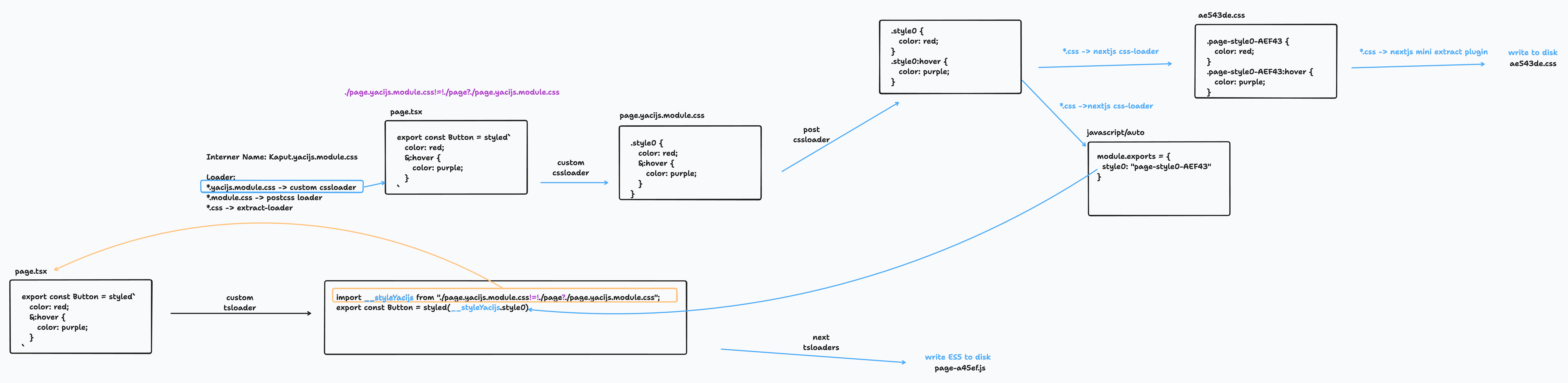
yak uses a Rust-based SWC plugin to extract CSS at build time. The extracted CSS is processed through the bundler's native CSS pipeline (PostCSS for webpack and Vite, Lightning CSS for Turbopack and Rsbuild), ensuring consistency between your CSS files and CSS-in-JS.
Atomic CSS
yak ships with atomic CSS support, so you can use tailwind out of the box without additional configuration.
import { styled, atoms } from "@yak/react";

// Mixing tailwind with custom styles
const Icon = styled.p`
  ${atoms("font-bold")}
  @supports (initial-letter: 2) {
    initial-letter: 2;
  }
`;

// Apply tailwind classes conditionally
const Button = styled.button`
  ${({ $primary }) =>
    $primary
      ? atoms("bg-blue-500 hover:bg-blue-700 text-white font-bold py-2 px-4 rounded")
      : atoms(
          "bg-transparent hover:bg-blue-500 text-blue-700 font-semibold hover:text-white py-2 px-4 border border-blue-500 hover:border-transparent rounded",
        )}
`;
Build Time Constants
The downside of dynamic properties is that they require inline style attributes. While this is not a problem for most cases, we can't use them for media queries.
yak allows you to define build time constants which can be used in your styles:
import { styled } from "@yak/react";
import { breakpoints, spacings } from "./constants.yak";

const Container = styled.div`
  padding: ${spacings.md};
  ${breakpoints.md} {
    padding: ${spacings.lg};
  }
`;
| Feature | Code | Yak Constant files |
|---|---|---|
| File Extension | .js, .jsx, .tsx, etc. |
.yak.js, .yak.jsx, .yak.tsx, etc. |
| Runs at | Runtime (Node or Browser) | Compile time (Bundler) |
| Side effects | ✅ | 🚫 |
| Yak Features | All (styled, css, ...) |
🚫 |
Yak shaving
While trying to get yak to work properly we stumbled across several bugs. Thanks for merging our PRs and fixes in Next.js, webpack, PostCSS, and more ❤️
- https://github.com/vercel/next.js/pull/51115 (fix inline matchResource
!=!) - https://github.com/vercel/next.js/pull/53796 (fix inline matchResource
!=!) - https://github.com/css-modules/postcss-modules-local-by-default/pull/64 (fix css nesting)
- https://github.com/css-modules/postcss-modules-local-by-default/pull/72 (fix css nesting)
- https://github.com/css-modules/postcss-modules-local-by-default/pull/78 (add cssmodules-pure-ignore)
- https://github.com/css-modules/postcss-modules-local-by-default/pull/85 (add cssmodules-pure-no-check)
- https://github.com/vercel/next.js/pull/62644 (upgrades postcss-modules-local-by-default for css nesting)
- https://github.com/webpack-contrib/mini-css-extract-plugin/pull/1084 (fix: improve esModule exports)
- https://github.com/vercel/next.js/pull/62639 (enable esmodule optimizations for css modules)
- https://github.com/vercel/next.js/pull/62733 (Minify post css class names in production)
- https://github.com/vercel/next.js/pull/64551 (fix lightningcss-loader)
- https://github.com/vercel/next.js/pull/77321 (add cssmodules-pure-no-check)
- https://github.com/webpack/webpack/pull/19012 (CSS Order without side effects)
- https://github.com/swc-project/swc/issues/3934 (Browser SWC Plugin support)
- https://github.com/parcel-bundler/lightningcss/issues/889 (add cssmodules-pure-no-check)
- https://github.com/QwikDev/qwik/pull/8351 (fix virtual CSS module resolution in dev SSR)
- https://github.com/vercel/next.js/pull/89600 (expose this._compilation to webpack loaders in Turbopack)
- https://github.com/vercel/next.js/pull/89901 (exempt data URL CSS from Pages Router global CSS restriction)
- https://github.com/webpack/mini-css-extract-plugin/pull/1162 (fix: use matchResource for importModule)
- https://github.com/solidjs/solid/issues/3090 (register factory-created components with solid-refresh)
- https://github.com/solidjs/solid/issues/3099 (fail the compile on parser-restructured templates)
Acknowledgments
Massive kudos to:
- @sokra: For guiding us through the webpack module and loader APIs
- @kdy1: For his support while rewriting our Babel plugin as a blazing fast SWC Rust WASM plugin
- @samcx: For his great help to merge features into Next.js
Special thanks to the contributors and the inspiring projects that influenced yak:
- Styled-Components: For pioneering the styled syntax and redefining styling in the React ecosystem
- Linaria: For its innovative approach to zero-runtime CSS in JS
- Emotion: For pushing the boundaries of CSS-in-JS
- Vanilla Extract: For its focus on type-safe, zero-runtime CSS
- Tailwind CSS: For its exceptional atomic CSS approach
License
yak is licensed under the MIT License.
Contributing
Contributions are welcome!
The contributing guide helps you get started with setting up the development environment and explains the development workflow
Feel free to reach out with any questions, issues, or suggestions!


