
Using Storybook with AI
Storybook's AI capabilities are currently in preview.
The API may change in future releases. We welcome feedback and contributions to help improve this feature.
Storybook's AI capabilities help you get more out of agentic development at every stage, from adding Storybook to a project to working with your components day to day.
Agentic setup configures Storybook for you and writes an initial set of stories for your project. The Storybook MCP server gives your agent ongoing access to your component documentation, story generation, and component tests.
Set up Storybook with an agent
Agentic setup analyzes your project and produces step-by-step instructions that an agent follows to add Storybook, configure the preview, write stories for your components, and verify them.
To get started, run this prompt in your agent:
Set up Storybook for me with npm create storybook@latest and follow its instructions preciselyFor the full walkthrough, see the agentic setup guide.
Connect your agent to Storybook
Once Storybook is set up, connect your agent to the Storybook MCP server so it can read manifests of your components and documentation, generate stories, and run tests against your live Storybook.
1. Install the addon
Run this command to install and register the Storybook MCP addon:
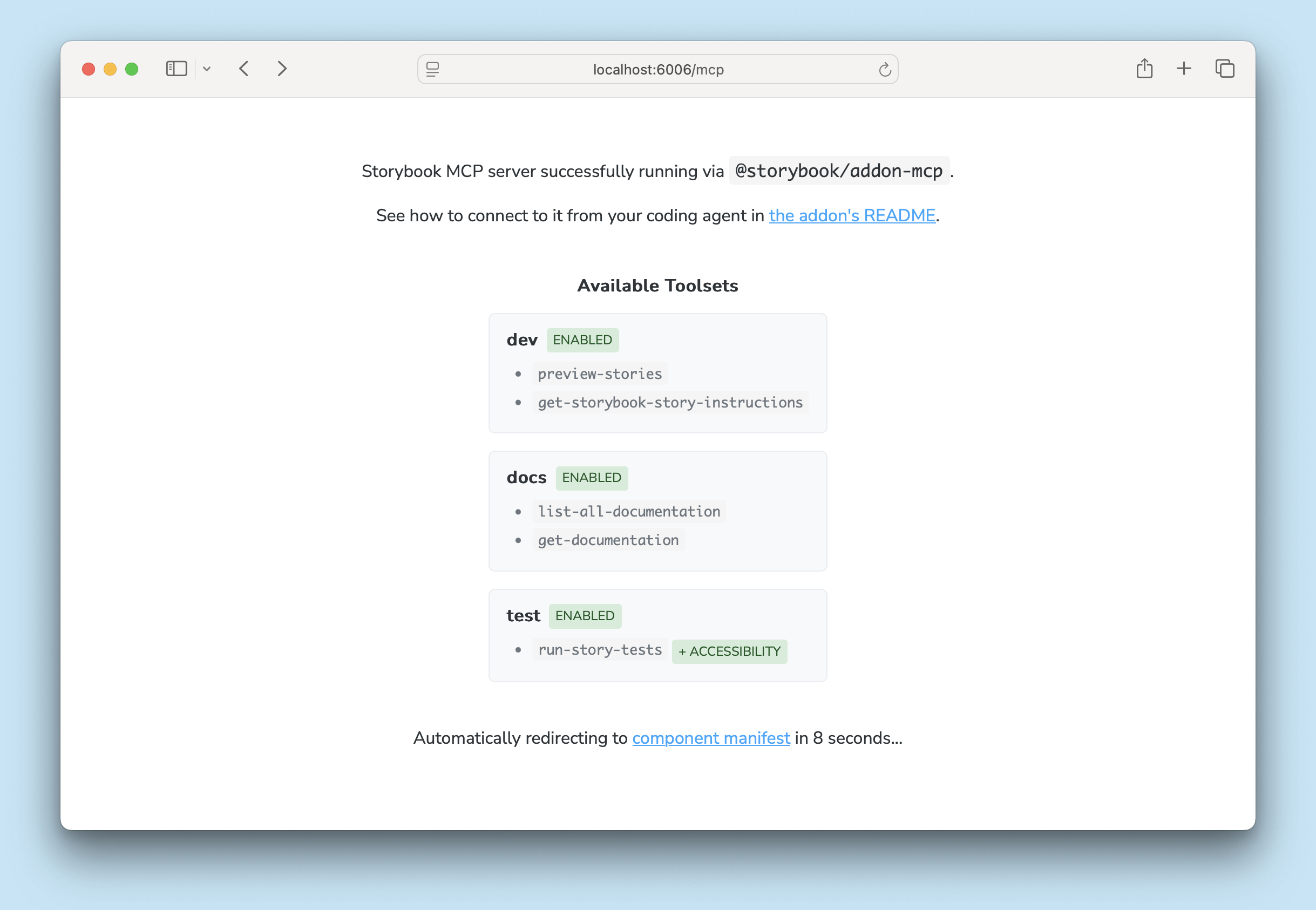
npx storybook add @storybook/addon-mcpNow, when running Storybook's dev server, you can access the MCP server at http://localhost:6006/mcp (your port may be different). When viewed in the browser, you'll see a page showing which tools are available and a link to the manifest debugger.
2. Enable the components manifest
The docs toolset reads the components manifest, which is off by default and is not generated by every framework. See framework support for what your framework needs.
// Replace your-framework with the framework you are using, e.g. react-vite, nextjs, nextjs-vite, etc.
import type { StorybookConfig } from '@storybook/your-framework';

const config: StorybookConfig = {
  framework: '@storybook/your-framework',
  stories: ['../src/**/*.mdx', '../src/**/*.stories.@(js|jsx|mjs|ts|tsx)'],
  features: {
    componentsManifest: true,
  },
};

export default config;
3. Add the MCP server to your agent
Then run this command to configure your agent to use the MCP server:
npx mcp-add --type http --url "http://localhost:6006/mcp" --scope projectYou may need to update the port number in the URL. You will be prompted for a name for your MCP server (e.g. "my-project-sb-mcp"). This is the name you'll use when calling the tools from your agent, so choose something descriptive and unique to avoid confusion with other tools.
mcp-add is a CLI tool designed to simplify adding MCP servers to various agents.
You can also follow your agent's documentation to add the MCP server as a tool provider manually, e.g. Claude Code, Google Gemini CLI, OpenAI Codex, VS Code Copilot, etc.
4. Adjust your agent instructions
To guide your agent to use your MCP server, you should adjust your AGENTS.md (or CLAUDE.md, if you're using Claude). The specifics will depend on your project and how you use agents in your development process, but something like this is a good starting point. Just make sure to replace your-project-sb-mcp with the name you chose for your MCP server toolset in the previous step.
Example instructions for AGENTS.md
When working on UI components, always use the `your-project-sb-mcp` MCP tools to access Storybook's component and documentation knowledge before answering or taking any action.

- **CRITICAL: Never hallucinate component properties!** Before using ANY property on a component from a design system (including common-sounding ones like `shadow`, etc.), you MUST use the MCP tools to check if the property is actually documented for that component.
- Query `docs-list` to get a list of all components
- Query `docs-show` for that component to see all available properties and examples
- Only use properties that are explicitly documented or shown in example stories
- If a property isn't documented, do not assume properties based on naming conventions or common patterns from other libraries. Check back with the user in these cases.
- Use the `get-storybook-story-instructions` tool to fetch the latest instructions for creating or updating stories. This will ensure you follow current conventions and recommendations.
- Check your work by running `test-run`.

Remember: A story name might not reflect the property name correctly, so always verify properties through documentation or example stories before using them.
Finally, test your agent's access to the MCP server. First, make sure your Storybook is running, then run a prompt like "List all documented components". You should see a call to the docs-list tool with a response listing components from your Storybook.
Key concepts
Understanding these concepts will help you make the most of Storybook's AI capabilities and guide you in choosing the right tool for each stage of your workflow.
Agentic setup
When you add Storybook to a project using an agent, Storybook generates project-specific instructions tailored to your framework, renderer, builder, language, and addons. An agent can follow those instructions to configure Storybook's preview, support patterns like portals and providers, mock side effects, write stories for your components, add interaction tests, and verify the result.
Manifests
Storybook collects all of the metadata about your components, stories, and docs into manifests. Each manifest is a JSON object that serves as a comprehensive map of your Storybook's content and structure. There are manifests for components, based on stories files, and for documentation, based on MDX files.
These manifests are automatically generated and updated as you work on your Storybook, ensuring that your agent always has access to the latest information about your project.
MCP server
Model Context Protocol (MCP) is a standard for communication between AI agents and external tools. Storybook's MCP server exposes your Storybook's content and functionality as a set of tools that your agent can call to retrieve component information, generate stories, run component tests, and more.
Which tools your agent gets depends in part on your framework. See framework support.
More AI resources